Prodia speed from FLUX.3 on our own GPUs
We recently tested how to augment Scry's image search results with generated images. Because it is part of a search experiment, it has to be fast enough to feel like search and not like generation.
We built the first version on Prodia's FLUX.2 klein 4B, the fastest image API we could find. Then FLUX.3 came out, and we wanted to know if we could get the newer, higher quality model at the same speed. No API provider offers FLUX.3 fast enough for this use, so we decided to see if we could host it ourselves and beat our current API options on speed and cost.
This post covers how close our own GPUs got to Prodia, what moved the number, and what did not.
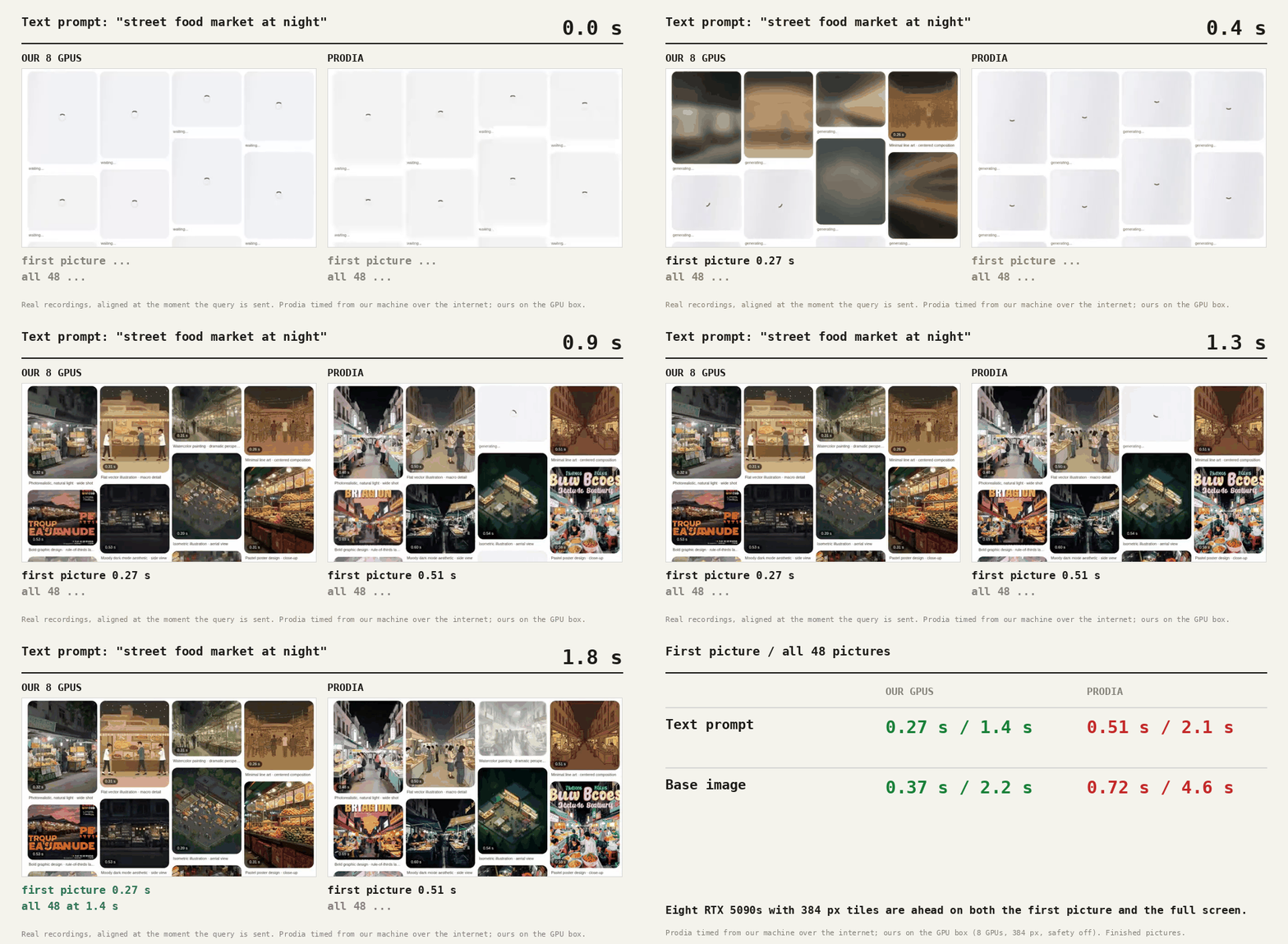
Text prompt, finished tile, 8 GPUs, 384 px. Prodia: 0.5 s in the browser.
Text prompt, 8 GPUs. Prodia: about 2 s.
8 GPUs. Prodia: about 5 s.
And four that did not.
What we built
To test this we made a demo that looks like Google Images, except every picture on screen is generated. You type a prompt and a wall of pictures fills in. You can also hand it a base image and ask for variations. Choosing "More like this" starts a new wall from that picture, and scrolling loads 12 more.
A search engine returns files that already exist. This one has to make every picture on screen, so two times matter: until the first picture appears, and until the screen is full. We ran the same page against two backends.
Prodia is hosted, runs FLUX.2 klein 4B and bills per picture. Our own setup runs FLUX.3 klein (5.6B) in fp8 on rented RTX 5090s, with a small router that sends each tile to the least busy card.
The demo, side by side
Same page, same prompt, same 48-tile first screen.
0.51 s to the first tile, 2.1 s for all 48.
0.27 s to the first finished tile, 1.4 s for all 48. Eight RTX 5090s, 384 px tiles.
0.72 s to the first tile, 4.6 s for all 48.
0.37 s to the first finished tile, 2.2 s for all 48. Eight RTX 5090s, 384 px tiles.
Where the time went
One image on one RTX 5090 started at roughly 0.77 s from our desk. The steps below took the first finished picture on the GPU box to 0.37 to 0.45 s at 512 px. The last row, 384 px tiles on eight GPUs, took the first text picture to 0.27 s (0.37 s from a base image). These are the changes in the order they paid off.
| Change | What it bought |
|---|---|
| Router on the GPU box | First tile from about 0.77 s to 0.54 to 0.73 s. One network leg gone, the biggest single step. |
| fp8 weights, torch.compile, 8 steps | About 0.55 s per edited image and 0.40 s per text image on the worker. 16 steps is 1.04 s. |
| Safety classifier off | About 78 ms off a single first tile. |
| Overlap text encode and VAE with the diffusion steps | Per image 422 to 357 ms. Same picture, byte for byte. |
| 6 steps for the first row | First finished tile from about 0.47 s to 0.34 to 0.41 s. |
| Early blurry preview, then crossfade | Something on screen at about 0.23 s, ahead of the final at about 0.41 s. No cost in sustained speed. |
| Shorter fades in the page | The final tile settles about 0.2 s sooner on screen. |
| 384 px tiles for the grid (8 GPUs) | 48 text tiles from about 2.4 s to 1.45 s, and 48 from a base image from about 3.6 s to 2.2 s. Per tile, about 1.6 times faster. |
The preview trick
The model works out a rough finished picture early. After step 3 of 8 we decode that estimate, send it as a small JPEG, and show it blurred. The real picture arrives about 0.15 to 0.2 s later and fades in over it, so the wall of tiles fills in almost at once instead of showing empty boxes. Step 2 does not work: the estimate is garbage that early.
The browser paints the preview about 45 ms after it arrives. Smaller preview images and blob URLs did not change the 20 to 30 ms decode, so we left them out.
What each step count looks like
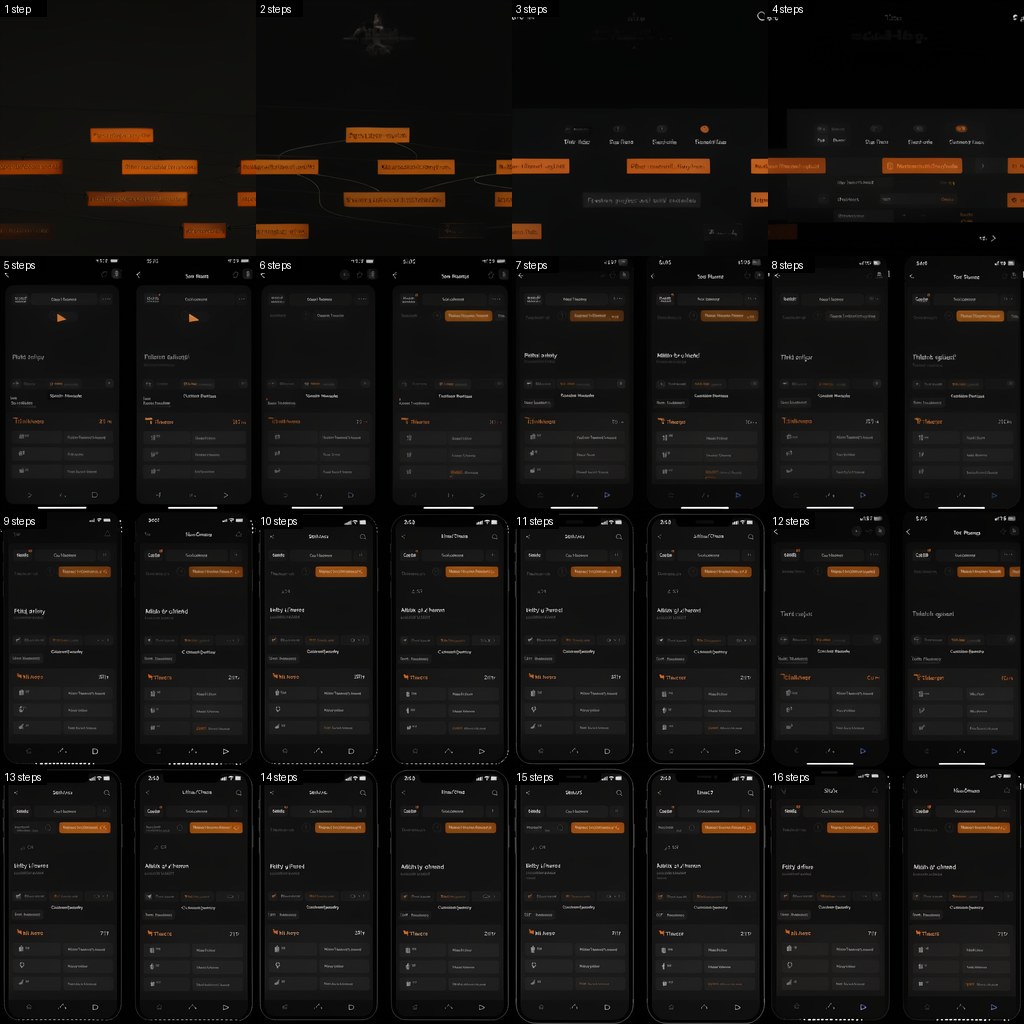
Fewer steps is the other way to go faster, so we generated the same edit at every step count from 1 to 16 with the same seed, base and prompt. Layout appears by step 5. By about step 10 the picture is close to the 16-step result. Steps 1 to 4 are broken.
| Steps | Seconds per image (RTX 5090) | Distance from 16 steps (LPIPS, lower is closer) |
|---|---|---|
| 16 | 1.04 | reference |
| 12 | 0.80 | 0.093 |
| 10 | 0.68 | 0.111 |
| 8, tuned schedule | 0.55 | 0.113 |
| 8, default | 0.55 | 0.130 |
| 6 | 0.43 | 0.175 |
| 4 | 0.30 | 0.233 |
Measured on an RTX 5090 with fp8 and compile at 512 px, one base image with four prompts. We picked 8 steps with the tuned schedule for the demo.
Where we stand against Prodia
On four GPUs we were level on the first picture and behind on the full screen. We rented eight RTX 5090s to see what scale and smaller tiles buy. Eight GPUs at 512 px gave 2.2 to 2.5 s for 48 text tiles. Dropping the grid tiles to 384 px gave 1.45 s. Prodia took 1.5 to 2.7 s for the same screen.
| Case (times in seconds) | Prodia | Ours, 8 GPUs, 384 px, first row 6 steps |
|---|---|---|
| Text, first finished tile | 0.2 to 0.25 | 0.25 to 0.33 |
| Text, 12th tile | about 0.5 | 0.45 to 0.58 |
| Text, 48 tiles | 1.5 to 2.7 | 1.4 to 1.5 |
| Base image, first finished tile | 0.7 to 0.9 | 0.36 to 0.37 |
| Base image, 12th tile | 1.9 to 3.0 | 0.73 to 0.81 |
| Base image, 48 tiles | about 5.3 | 2.2 to 2.3 |
Measured over three runs per case, safety classifier off, router on the GPU box. Prodia was called from our desk, so its times include the internet trip. On the first text tile Prodia is a little ahead of us. Everywhere else we are level or ahead.
Through the desk-to-box tunnel our runs take about 0.2 s longer. A closer location, or racing Prodia and our cards and showing whichever answers first, would cut that.
Money
Prodia charges $0.0005 for a text image and $0.0010 with an input image. A rented 5090 costs the same per hour whether it is busy or idle. Always-on, a single 5090 beats Prodia only above roughly 33,000 images a day, and below that hosted is cheaper. A fully busy card at 8 steps costs about $0.00015 a picture.
The reasons to host anyway are control over the model and no per-picture bill at scale. FLUX.3 also takes reference images for editing and can be fine-tuned.
Starting a box
Renting a fresh RTX 5090 and getting the first text picture out takes 133 s, and 163 s until every path is warm. That is down from 230 s. The model download (about 21 GB) is now the long part at about 65 s, and a saved compile cache brings the compile step from minutes to about 50 s. A stopped box that we restart takes about 2 min 10 s, so keeping stopped boxes around barely beats a fresh start.
The 8-GPU box took 590 s to be ready, but 271 s of that was uploading the 97 MB compile cache from our slow office link. Setup itself was 42 s and the first worker was serving text about a minute later. Hosting the cache next to the box would remove most of that gap.
What did not help
- nvfp4, the 4-bit format. About 25% faster on one box and about 4 times slower on another, probably recompiling. Its quality at 8 steps also scored worse. We dropped it.
- Skipping the tunnel. A direct connection showed no gain. Both are limited by distance.
- Smaller previews and blob URLs. The browser still takes 20 to 30 ms to decode.
- Reusing the reference image's attention (K/V). Up to 33% faster per edited image, but the output visibly changes (LPIPS 0.11 to 0.21 against the normal result). We did not ship it.
- A text-embedding cache. Only about 2.5% faster on text pictures.
- CUDA graphs and custom kernels. A profile showed about 62% of GPU time in the fp8 matrix multiplies and about 10 to 15% in attention, so there is little left for a custom kernel to win.
- Batching beyond 2. Batch sizes 1, 2, 8 and 16 cost 1.12, 1.04, 1.02 and 1.03 s per image.
Limits
Quality was judged by eye and by LPIPS, not by a user study. The 8-GPU numbers are for 384 px grid tiles. We checked 384 px quality on one GPU only and have not run a full comparison. The step grid and the other single-GPU speeds are for 512 px square pictures. The step grid covers one base image and prompt.