Link Figma to any Storybook, then see where they drift
Every team with a design system keeps it twice: once as Figma components, once as code with a story for each state. The two copies start identical and then drift apart one merged PR and one nudged auto-layout at a time. Nothing connects a layer to the story that implements it, so the drift stays invisible until somebody opens a screen and notices it by eye.
Scry Link is a Figma plugin that puts the missing connection in the file itself. It works with any hosted Storybook, linking needs no account, and once a layer is linked you can open its live story from Figma — or put the two images next to each other and see what moved.
What linking actually is
You paste your Storybook URL once, select a layer, find its story, and click Link. Components, component sets, instances and plain frames can all be linked.
The link is not stored in your settings or on our servers. It goes into the Figma file's shared plugin data — the Storybook URL on the document root, the story reference on the node — under the namespace scry_storybook_linker. That has two consequences worth knowing:
- Everyone editing the file sees the same links. There is nothing to sync, invite or re-enter, and a teammate who has never run the plugin still inherits the file's Storybook connection.
- Instances inherit their main component's link. Link the
Buttoncomponent set once and every instance of it across the file resolves to the same story, which is what makes linking a large library tractable at all.
Every linked layer also gets a View Story relaunch button in the Figma sidebar. One click opens the live story in the browser, at the deployed Storybook, in the variant you linked.
One honest limitation lives here. Figma exposes a file's key only to plugins published privately inside an organisation, and Scry Link is public — so the plugin asks for the file's URL once per document and parses the key out of it. One prompt, the first time, then never again for that file.
Suggest links: names first, screenshots when signed in
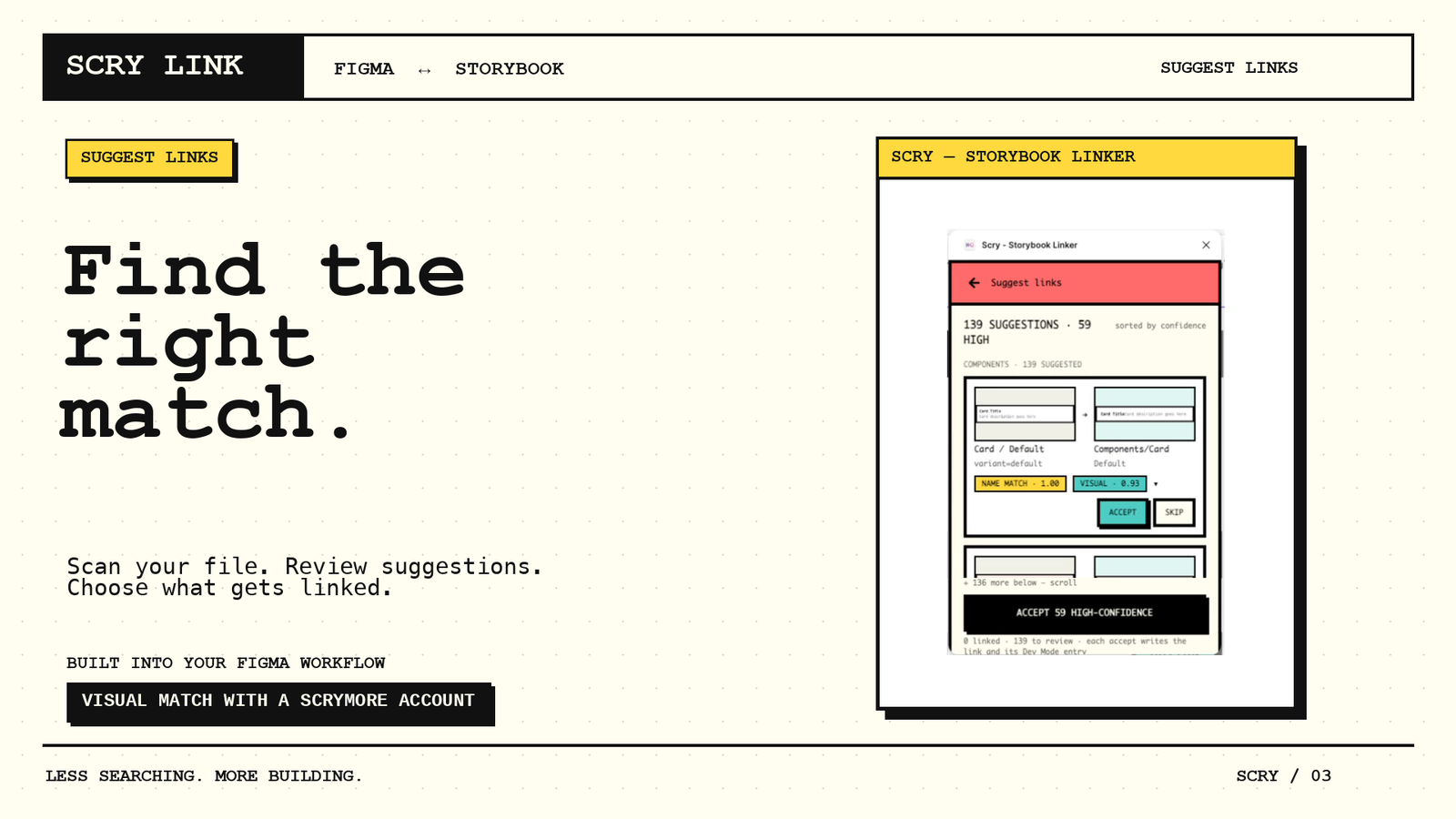
Linking by hand is fine for five components and hopeless for two hundred. Suggest links scans a selection, the current page, or the whole file, and comes back with a review list of proposed pairs you can accept in bulk.
The scan collects every variant of a component set, standalone components, and top-level frames that look like screens (between 100 and 3000 px on each side). It deliberately skips instances, which inherit anyway, along with hidden layers, names that start with _ or iOS/, and anything already linked.
Matching then runs on names. Both sides are broken into tokens — camelCase splits, separators split, leading zeros are dropped — so screen-04, Screen 04 and screen04 are all the same layer to the matcher. The tokens are compared with a weighted overlap score in which real words count for more than bare numbers, and at least one real word must match, so Untitled 3 never gets proposed for Screen 03. Storybook's generic top-level groups (Components/, Screens/, Atoms/) are ignored as identity, and story names like Default and Base are treated as "the plain one" for a component with no variants. Each proposal is marked high or medium confidence and keeps up to five alternatives you can switch to.
Name matching does exactly as well as your two naming conventions agree, which is often not very well. Card/Listing in Figma and HostCard in code are the same component and share no tokens at all. That is where signing in changes the result: with a free account the plugin exports a small thumbnail of each scanned layer and asks the Scry dashboard for the closest story screenshots in the project's most recent build, by image similarity. Visual matching uses AI credits, at 1 credit per 10 layers scanned, from the 2,000 a free account gets each month. A story's final score is the better of its name score and its visual score, and each row shows chips telling you which matcher had the opinion — so you can see at a glance whether a pair was proposed because the names agree, because the pixels agree, or both.
The diff: overlay and side by side
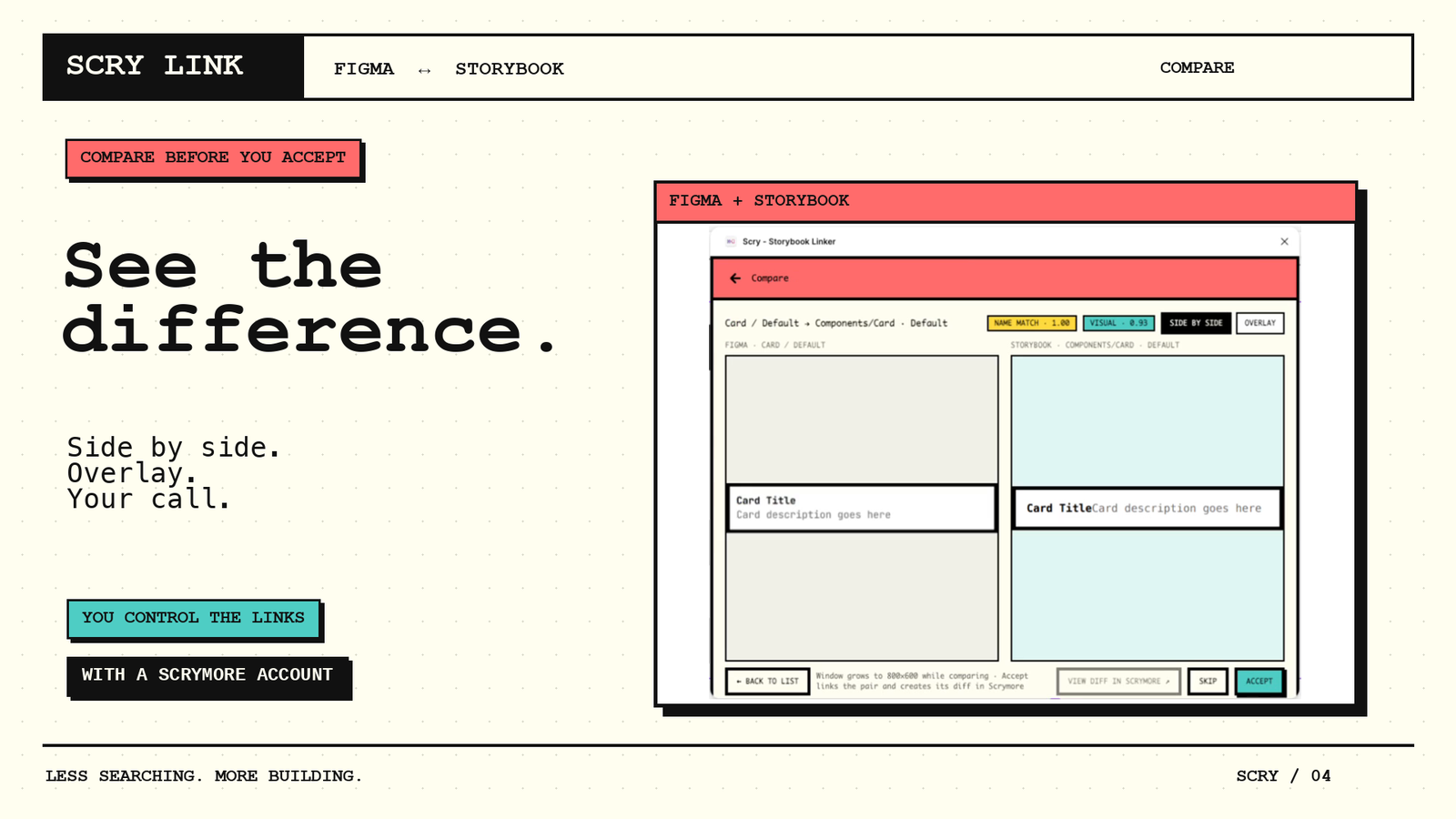
Accepting a suggestion is a judgement call, and a ranked score is a poor way to make it. Any proposed pair can be opened in compare view instead, which shows the two images two ways.
Side by side puts the Figma export on the left and the Storybook screenshot on the right. It is the better mode for content questions — a label that changed, an icon that is missing, a state that was never built.
Overlay stacks them in one box, with the Storybook screenshot on top of the Figma frame and an opacity slider that starts at 50%. Dragging that slider is what surfaces the geometry: padding that grew by four pixels, a type size that fell back, a column that sits slightly left of where it was drawn. These are the differences that are essentially impossible to see in two images sitting next to each other, and obvious the moment they are stacked.
Accept or Skip moves you straight to the next pending pair, so a page of suggestions is reviewed in one pass rather than one round trip per component.
This is the manual version of a question we have been measuring on this blog with agents: whether a reviewer, human or model, can look at a reference and an implementation and say what changed. Once a pair is linked and synced, the Scrymore dashboard's Design Sync can run that review for you, as a Basic or Plus AI diff. The plugin makes the pair exist in the first place.
What is free, and what needs an account
| Signed out | Free Scrymore account | |
|---|---|---|
| Connect any hosted Storybook by URL | Yes | Yes |
| Browse and search stories inside Figma | Yes | Yes |
| Link a component, set, instance or frame | Yes | Yes |
| Instances inherit their main component's link | Yes | Yes |
| View Story button on every linked layer | Yes | Yes |
| Suggest links, matched by name | Yes | Yes |
| Suggest links, matched by screenshot | — | Yes |
| Screenshot sync, overlay and side-by-side diffs | — | Yes |
| Preview a private Storybook inside the plugin | — | Yes |
| Dev resource links on linked layers (project connected in the dashboard) | — | Yes |
| Request a missing component as a GitHub issue | — | Yes |
| AI diffs in Design Sync (Basic or Plus) | — | Yes, with AI credits |
There is no paid tier in this list because there is not one yet. The account exists because visual matching and diffs need somewhere to hold the build's screenshots. The AI features run on credits: every free account gets 2,000 a month, visual matching costs 1 credit per 10 layers, and an AI diff costs 10 credits on Basic, or 40 on Plus when a busy screen needs the extra Claude Opus check. Linking, browsing, name matching and the compare view never use credits.
On what leaves your machine: signed out, the plugin reads the Storybook URL you typed in (its index.json and story previews) and sends anonymous usage events and error reports to us. Those never include layer names, text, file names or designs, and you can turn them off in Settings → Privacy. Signed in, it also sends the frames you choose to sync, along with their layer, page and file names and the story they are linked to. What Scry Link collects has the full list.
Try it
- The plugin: Scry - Storybook Linker on Figma Community. Run it, paste a Storybook URL, link one component.
- No Storybook handy? Open the plugin's playground from its Community page. You get a copy of Kettle, a small demo app whose Figma file is already connected to its public Storybook, so you can run Suggest links on a real page in about a minute.
- The docs: setting up Scry Link.
- Tell us what broke: the feedback form. Bug reports are more useful to us than compliments right now — especially the naming convention that defeated the matcher.
If it saves you an afternoon, a ♥ on the Community listing is how other Storybook teams find it.