Beyond Screenshots: AI Agents for Figma-to-Storybook Diffs
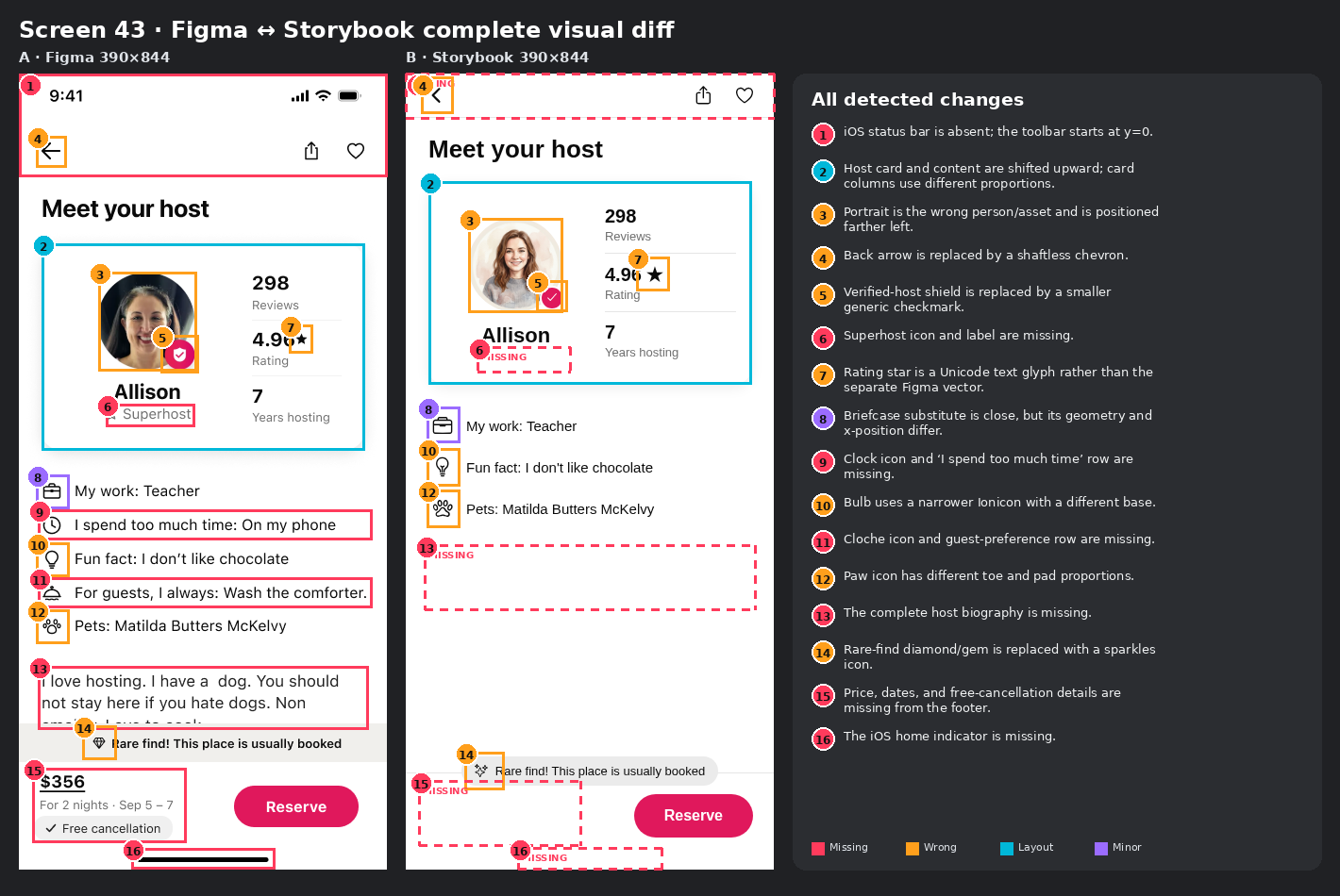
In our first Scry Design Diff Eval post, we asked whether vision language models could review mobile UI from screenshots alone. The short answer was: somewhat, but not well enough to be competitive with a human reviewer. The best models caught roughly two fifths of the issues people had tagged, and they struggled most on dense screens and small visual details.
That left us with the follow-up question: what happens if the model gets the same evidence a coding agent would have while working on the UI?
Instead of only giving it two screenshots, we gave an agent:
- the raw Figma layer tree, including text, hierarchy, component names, styles, and coordinates;
- a Storybook screenshot captured at the exact Figma frame size;
- the live HTML DOM, element bounds, and computed styles;
- the implementation source;
Figma JSON and HTML do not directly match
The first thing we learned is that there is no useful raw Figma JSON === HTML comparison.
A Figma frame might contain a component instance, several nested frames, vector paths, and text nodes. The matching UI might use React components, wrapper elements, pseudo-elements, an icon font, and a completely different hierarchy. Even when the final screens look similar, the two trees are not isomorphic.
The useful bridge is semantic and geometric:
- Match text by content and nearby labels.
- Match controls by role and visual position.
- Compare normalized bounds rather than node depth.
- Use source imports and component names to identify assets.
- Treat screenshots as the final authority for what is actually visible.
Note: The Figma and source would require initial set up for the agent. In our case we used Scry, but other tools such as Figma Code Connect would suffice.
What the runs looked like
These are the completed runs on this screen. Coverage is semantic recall against the 16-item manual review, and icon accuracy is measured across the 13 icon candidates. Every configuration below now uses the same final uncapped agent.
| Model and effort | Coverage | Icon decisions | Cost |
|---|---|---|---|
| GPT-5.6 Sol low | 14/16 | 11/13 | $0.316 |
| GPT-5.6 Sol medium | 16/16 | 13/13 | $0.441 |
| GPT-5.6 Sol xhigh | 16/16 | 13/13 | $1.068 |
| GPT-5.6 Terra max | 16/16 | 11/13 | $1.025 |
| GPT-5.6 Terra xhigh | 12/16 | 9/13 | $0.442 |
| Claude Fable 5 xhigh | 11/16 | 9/13 | $1.387 |
| Claude Opus 4.8 low | 10/16 | 8/13 | $0.294 |
| Kimi K3 low | 10/16 | 7/13 | $0.143 |
| MiniMax M3 low | 10/16 | 9/13 | $0.023 |
| Gemini 3.5 Flash low | 10/16 | 8/13 | $0.057 |
| Claude Sonnet 5 low | 8/16 | 7/13 | $0.118 |
Cost vs. composite performance, screen 43
11 model configurations · composite = mean of change coverage (of 16) and icon coverage (of 13) · one run each
| Detector | Type | composite performance | Cost / screen |
|---|---|---|---|
| GPT-5.6 Sol medium · frontier | on the frontier | 100.0% (16/16 changes · 13/13 icons) | $0.44 |
| GPT-5.6 Sol xhigh | single run | 100.0% (16/16 changes · 13/13 icons) | $1.07 |
| GPT-5.6 Terra max | single run | 92.3% (16/16 changes · 11/13 icons) | $1.02 |
| GPT-5.6 Sol low · frontier | on the frontier | 86.1% (14/16 changes · 11/13 icons) | $0.32 |
| GPT-5.6 Terra xhigh | single run | 72.1% (12/16 changes · 9/13 icons) | $0.44 |
| Claude Fable 5 xhigh | single run | 69.0% (11/16 changes · 9/13 icons) | $1.39 |
| MiniMax M3 low · frontier | on the frontier | 65.9% (10/16 changes · 9/13 icons) | $0.023 |
| Gemini 3.5 Flash low | single run | 62.0% (10/16 changes · 8/13 icons) | $0.057 |
| Claude Opus 4.8 low | single run | 62.0% (10/16 changes · 8/13 icons) | $0.29 |
| Kimi K3 low | single run | 58.2% (10/16 changes · 7/13 icons) | $0.14 |
| Claude Sonnet 5 low | single run | 51.9% (8/16 changes · 7/13 icons) | $0.12 |
- Best value at its budget (frontier)
- Other runs
- Frontier
For this quick view, composite performance is the average of structural coverage and icon-decision accuracy. It is an exploratory summary of this one screen—not a new benchmark score—but it makes the tradeoff easy to see: MiniMax M3 low was the cheapest tested run, Sol low reached 86.1% composite performance for $0.316, and Sol medium reached the best observed result for $0.441.
What's Next
This helps move VLM design reviews from impractical to realistic. An agent with captures, Figma structure, live DOM evidence, source code, and focused visual tools can be a feasible replacement for human visual inspection. Our next goal is to expand on this while also testing ways to improve upon the cost/performance frontier.
Resources
- Figma file and node endpoints and the Figma node type reference explain the raw design tree.
- Figma Code Connect is the most relevant official path for connecting design-system components to source components.
- Storybook’s guide to writing stories and its story permalink documentation cover deterministic component states and stable story IDs.
- Playwright visual comparisons are a good foundation for repeatable browser screenshots.
- The original Scry Design Diff Eval dataset is a useful screenshot-only baseline, Scry Design Diff Eval post